Showing posts with label vvowproject. Show all posts

Getting started with WebRTC

The emerging WebRTC standards and the corresponding Javascript APIs allow creating web-based real-time communication systems that use audio and video without depending on external plugins such as Flash Player. I got involved in a couple of interesting projects that use the pre-standard WebRTC API available in the Google Chrome Canary release. This article describes how to get started with these projects.

The first step is to download a browser that supports WebRTC, e.g.,  Google Chrome Canary. In your browser address bar, go to chrome://flags, search for Enable Media Stream and click to enable it. This enables the WebRTC APIs for your web applications running in the browser. Use this browser for getting started with the following two projects.

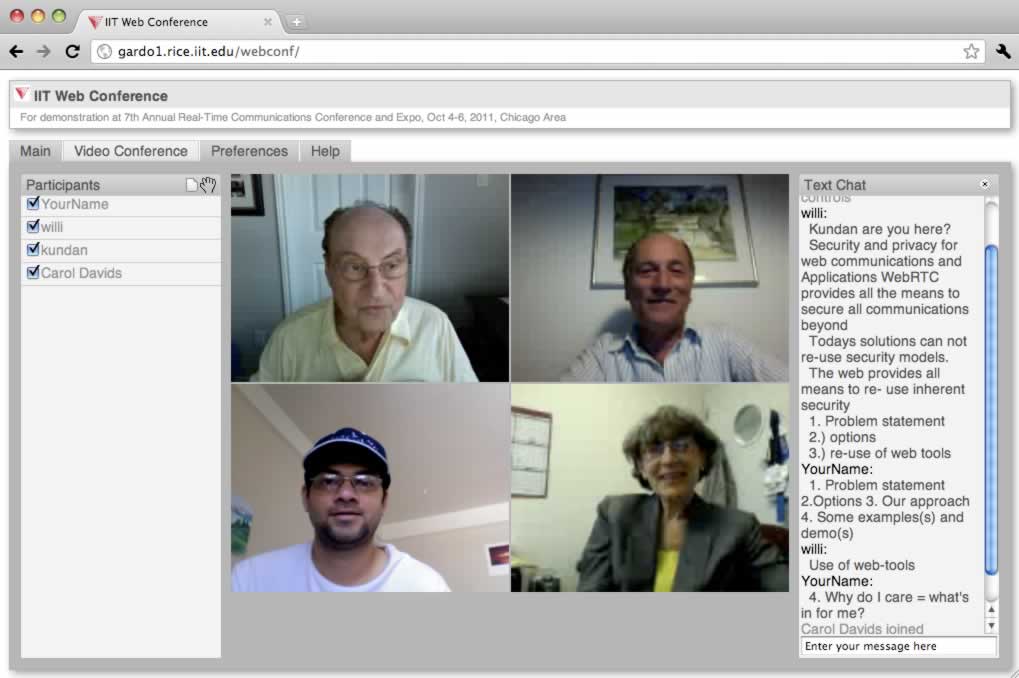
1. The first project is voice and video on web that enables web-based audio and video conferencing among multiple participants. It uses resource-oriented data access to move all the application logic running to the client application in HTML/Javascript, whereas the server merely acts as a data store interface. The architecture enables scalable and robust systems because of the thin server. The source code of WebRTC integration is available in the SVN branch, webrtc. Follow the instructions on the project web page to install and configure the system, but use the link to the webrtc branch instead of trunk in SVN. After visiting the main page of the installed project, see the help tab to create a new conference. On the preferences page, make this conference persistent, check to enable WebRTC and uncheck to disable Flash Player for this conference. Visit the conference from multiple tabs in your browser, using different user names. Let the moderator participant enable the video checkboxes for various participants to see the audio and video flowing via WebRTC among the participants.

2. The second project is SIP in Javascript that creates a complete SIP endpoint running in your browser. It contains a SIP/SDP stack implemented in Javascript along with a SIP soft-phone demonstration application. It has two modes: Flash and WebRTC. In the WebRTC mode, it uses a variation of SIP over WebSocket and secure media over WebRTC. The default mode is to use Flash, which you can change to WebRTC as follows. Checkout the source code from SVN and put it on a web server. Install and run a SIP proxy server that supports SIP over WebSocket as mentioned on the project page. Now visit the page on your web server phone.html?network_type=WebRTC on two tabs of your browser. Follow the getting started instructions on that page to register on the first tab's phone with one name, and on the second with another, and try a call from the first to the second. This is an example program trace at the proxy server from a past experiment on how the WebRTC capabilities are negotiated between the two phones using SIP over WebSocket. In addition to the network_type, you can also supply additional parameters on the page URL to pre-configure the phone, e.g., username, displayname, outbound_proxy, target_value. Example links are available to configure as alice and bob to connect to the web and SIP server on localhost, assuming your webserver is running locally on port 8080 and SIP server on websocket port 5080. Just open the two URLs in the two tabs, click on Register on each, make a call from one to another by clicking on the Call button, accept the call from another by clicking on the Call button, and see the audio and video flowing via WebRTC between the two phones.


Voice and Video Communications on Web


I co-authored and presented a paper on "SIP APIs for voice and video communications on the web" at IPTcomm 2011. The paper compares various alternative architectures, and presents the components of our ongoing project at IIT, Chicago. We are open to sponsorship of the project to further continue its R&D work. Please feel free to get in touch with me or Prof. Davids if you are interested in sponsoring student projects in her lab related to this technology.

The paper and the presentation slides are available. The project page, open source code, and free demonstration page are also available.

Abstract: Existing standard protocols for the web and Internet telephony fail to deliver real-time interactive communication from within a web browser. In particular, the client-server web protocol over reliable TCP is not always suitable for end-to-end low latency media path needed for interactive voice and video communication. To solve this, we compare the available platform options using the existing technologies such as modifying the web programming language and protocol, using an existing web browser plugin, and a separate host resident application that the web browser can talk to. We argue that using a separate application as an adaptor is a promising short term as well as long-term strategy for voice and video communications on the web. Our project aims at developing the open technology and sample implementations for web-based real-time voice and video communication applications. We describe the architecture of our project including (1) a RESTful web communication API over HTTP inspired by SIP message flows, (2) a web-friendly set of metadata for session description, and (3) an UDP-based end-to-end media path. All other telephony functions reside in the web application itself and/or in web feature servers. The adaptor approach allows us to easily add new voice and video codecs and NAT traversal technologies such as Host Identity Protocol. We want to make web-based communication accessible to millions of web developers, maximize the end user experience and security, and preserve the huge global investment in and experience from SIP systems while adhering to web standards and development tools as much as possible. We have created an open source prototype that allows you to freely use the conference application by directing a browser to the conference URL.

RESTful communication over WebSocket

This article shows how to implement generic resource oriented communication on top of synchronous channel such as WebSocket. This is a continuation of my previous article on REST and SIP [1] and provides more concrete thoughts because I now have an actual implementation of part of this in my web conferencing application. Other people have commented on the idea of REST on WebSocket [2]. (Using the term RESTful, which inherently is stateless, is confusing with a stateful WebSocket transport. Changing the title of this article to "Resource oriented and event-based communication over WebSocket" is more appropriate.)

Following are the basic principles of such a mechanism.
  1. Enable resource-oriented (instead of RPC-style) communication.
  2. Enable asynchronous notification when a resource (or its child resource) changes.
  3. Enable asynchronous event subscribe, publish, and notification.
  4. Enable Unix file system style access control on resources.
  5. Enable the concept of transient vs persistent resources.
Consider my favorite example of web conferencing application. The logged in users list is represented as resource /login relative to the hosting domain, and the calls list as /call. If the provider supports concept of registered subscribers, those can be at /user. For example, /user/kundan10@gmail.com can be my user profile.

Now let us look at how the four motivational points apply in this example.

1) Enable resource-oriented (instead of RPC-style) communication.

Every resource has its own representation, e.g., in JSON or XML. For example, /login/bob@home.com can be {"name": "Bob Smith", "email": "bob@home.com", "has-video": true, "has-audio": true}. The client-server communication can be over HTTP using standard RESTful or over WebSocket to access these resources.

Over WebSocket, the client sends a request of the form '{"method":"PUT","resource":"/login/bob@home.com", "type":"application/json","entity":{"name":"Bob Smith", ...}}' to login. The server treats this as same as that received on just HTTP using RESTful PUT request.

A resource-oriented (instead of RPC-style) communication allows us to keep all the business logic in the client, which uses the server only as a data store. The standard HTTP methods allow access to such data, e.g., POST to create, PUT to update, GET to read and DELETE to delete. POST is a special method that must return the resource identifier of the newly created resource. For example, when a client does POST /call to create a new call, the server returns {"id": "conf123"} to indicate that the new resource identifier is "conf123" relative to /call and call be accessed at "/call/conf123".

2) Enable asynchronous notification when a resource (or its child resource) changes.

Many web applications including web conferencing need the notion of asynchronous notifications, e.g., when a user is online, or a user joins/leaves a call. Traditionally, Internet communication has used protocols such as SIP and XMPP for asynchronous notifications. With the advent of WebSocket (and the popular socket.io project) it is possible to implement persistent client-server connection for asynchronous notifications and messages within the web browser.

In this mechanism, a generic notification architecture is applied to resources. A new method named "SUBSCRIBE" is used to subscribe to any resource. A subscriber receives notification whenever the resource or its immediate children are changed (created, updated or deleted). For example, a conference participant sends the following over WebSocket: '{"method":"SUBSCRIBE","resource":"/call/conf123"}'. Whenever the server detects that a new PUT is done for "/call/conf123/participant12" or a new POST is done for "/call/conf123" it sends a notification message to the subscriber over WebSocket: '{"notify":"UPDATE","resource":"/call/conf123","type":"application/json","entity":{ ... child resource}, "create":"participant12"}'. On the other hand, if the moderator does a PUT on "/call/conf123", then the server sends a notification as '{"notify":"PUT","resource":"/call/conf123","type":"application/json", "entity":{... parent resource}}'. In summary, the server generates the notification to both the modified resource "/call/conf123/participant12" as well as the parent resource, "/call/conf123".

The notification message contains a new "notify" attribute instead of re-using the "method" attribute to indicate the type of notification. For example, "PUT", "POST", "DELETE" means that the resource identified in "resource" attribute has been modified using that method by another client. In this case the "type" and "entity" attribute represent the "resource". Similarly, "UPDATE" means that a child resource has been modified and the details of the child resource identifier is in "create", "update" or "delete" attribute. In this case the "type" and "entity" attribute represent the child resource identified in "create", "update" or "delete".

The concept of notifications when a resource change is available in ActionScript programming language. For example, a markup text can use width="{size}" to bind the "width" property of a user interface component to the "size" variable. Whenever the "size" changes the "width" is updated. A property change event is dispatched to enable the notification. Similarly in our mechanism, a resource can be subscribed for to detect change in its value or the value of its children resources by the client application.

3) Enable asynchronous event subscribe, publish, and notification

The previous point enables a client to receive notification when a resource changes and these notifications are server generated notifications. Additionally, we need a generic end-to-end publish-subscribe mechanism to allow a client to send notification to all the subscribers without dealing with a resource modification. This allows end-to-end notifications from one client to others, via the server.

When a client subscribes to a resource, it also receives generic notifications sent by another client on that resource. A new NOTIFY method is defined. For example, if a client sends '{"method":"NOTIFY","resource":"/login/bob@home.com","type":"application/json","data":{"invite-to":"/call/conf123","invite-id":"6253"}}', and another client is subscribed to /login/bob@home.com, then it receives a notification message as '{"notify":"NOTIFY", "resource":"/login/bob@home.com","type":"application/json","data":{...}}'. In summary, the server just passes the "data" attribute to all the subscribers. The "notify" value of "NOTIFY" means an end-to-end notification generated because another client sent a NOTIFY method.

In a web conferencing application, most of the notifications are associated with a resource, e.g., conference membership change, presence status change, etc. Some notifications such as call invitation or cancel can be independent of a resource, and the NOTIFY mechanism can be used. For example, sending a NOTIFY to /login/bob@home.com is received by all the subscribers of this resource.

4) Enable Unix file system style access control on resources.

Without an authentication and access control mechanism, the resource oriented communication protocol described earlier becomes useless. Fortunately, it is possible to design a generic access control mechanism similar to Unix file system. Essentially, each resource is treated as a file and a directory. In analogy, all the child resources of this resource belong to the directory, whereas the resource entity belongs to the file. The service provider can configure top-level directories with user permissions, e.g., anyone can add child to "/user", and once added will be owned by that user. Thus if user Bob creates /user/bob, then Bob owns the subtree of this resource. It is up to Bob to configure the permissions of its child resources. For example, it can configure /user/bob/inbox to be writable by anyone but readable only by self, e.g., permissions "rwx-w--w-". This allows a web based voice and video mail application.

Unlike traditional file system data model with create, update, read and write, we also need permissions bit for subscription. For example, only Bob should be allowed to subscribe to /user/bob so that other users cannot get notifications sent to Bob. The concept of group is little vague but can be incorporated in this mechanism as well. Finally, a notion of anonymous user needs to be added so that any client which does not have account with the service provider can also get permissions if needed.

In summary, the permissions bits become five bits for each of the four categories: self, group, others-authenticated, others-anonymous. The four bits define permissions to allow create, read, update, write and subscribe. Existing authentication such as HTTP basic/digest, cookies or oAuth based sessions can be used to actually authenticate the client.

5) Enable the concept of transient vs persistent resources.

In software programming, application developers typically use local and global variables to represent transient and persistent data respectively. A similar concept is needed in the generic resource oriented communication application. So far we have seen how to read, write, update and create resources. Each resource can be transient, so that it is deleted when the client which created the resource is disconnected, or persistent which remains even after the client disconnects. For example, when a client POSTs to /call/conf123, it wants that resource to be transient which gets deleted when the client is disconnected. This causes the resource to be used as a conference membership resource, and the server notifies other participants when an existing participant is disconnected. On the other hand, when a client POSTs to /user/bob@home.com, it wants it to be the persistent user profile which is available even when this user has disconnected.

The concept of transient and persistent in the resource-oriented system allows the client to easily create a variety of applications without having to write custom kludges. In general a new resource should be created as transient by default, unless the client requests a persistent resource. Whenever the client disconnects the WebSocket all the transient resources (or local variables) of that client are deleted, and appropriate notifications are sent to the subscribers as needed.

Implementation

I have implemented part of this concept in my web conferencing project. The server side (called as service provider) is a generic PHP "restserver.php" application that accepts WebSocket connections and uses a back-end MySQL database to store and manage resources and subscriptions. Each connected client is assigned a unique client-id. There are two database tables: the resource table has fields resource-id (e.g., "/login/bob@home.com"), parent-resource-id (e.g., "/login"), type (e.g., "application/json"), entity (i.e., actual JSON representation string), and client-id, whereas the subscribe table has fields resource-id of the target resource and client-id of the subscriber. The subscriptions are always transient, i.e., when the client disconnects the all subcribe rows are removed for that client-id. The resources can be transient or persistent. By default any new resource is created as transient and the client-id is stored in that row. When the client disconnects all the resources with the matching client-id are removed and appropriate notifications generated. A client can create persistent resource by supplying "persistent": true attribute in the PUT or POST request, and the server puts empty client-id for that new resource.

The generic "restserver.php" server application can be used in a variety of web communication applications, and we have shown it to work with web conferencing and slides presentation application.